

CREALITY FALCON A1 10W Laser Engraver, 80W Enclosed Laser Cutter and Engraver Machine with Air Assist, Smart Camera Positioning, 600mm/s Speed, Smart Material Recognition, Ideal for Wood & Metal
$549.00
Related Products





From the brand

Laser Cutter & Engraver
Beginner-friendly Machines
Advanced Version-machine
Laser Engraver Accessories

【Ready to Use, Craft Easier】Ready to use straight out of the box. Falcon A1 10w laser engraver has pre-set different optimal parameter settings for your engraving, you can skip the trials and jump straight to success. The Falcon Design Space Software integrate creative browsing, vector design, device control and other functions for you to start their creative journey effortlessly.
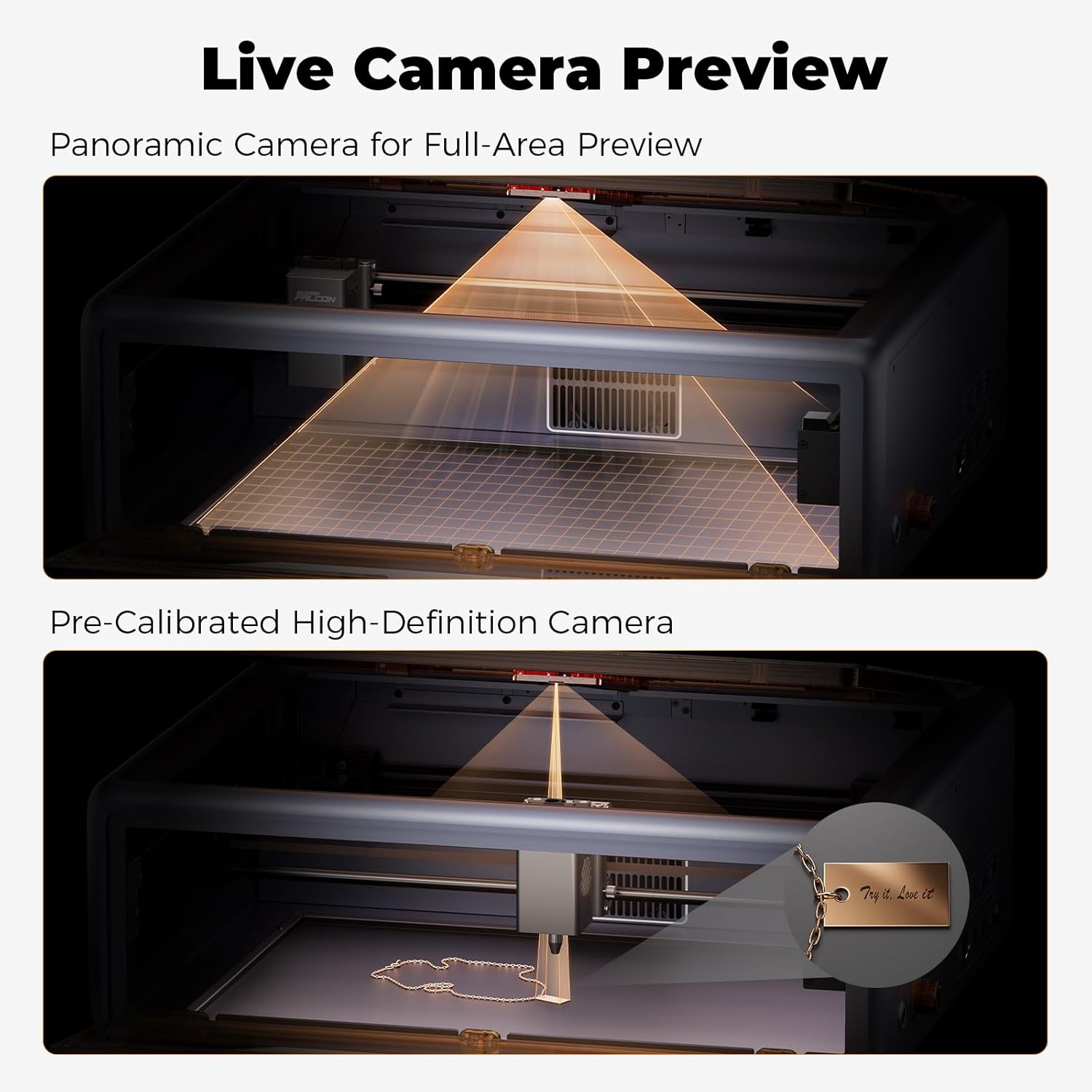
【Smart Camera】The laser engraver machine, equipped with a pre-calibrated HD camera, offers you a full-frame view of the engraving area, allowing you to effortlessly lock onto the object you wish to engrave. Cuts out all the headache of manual tweaking and makes the whole setup smooth as butter.
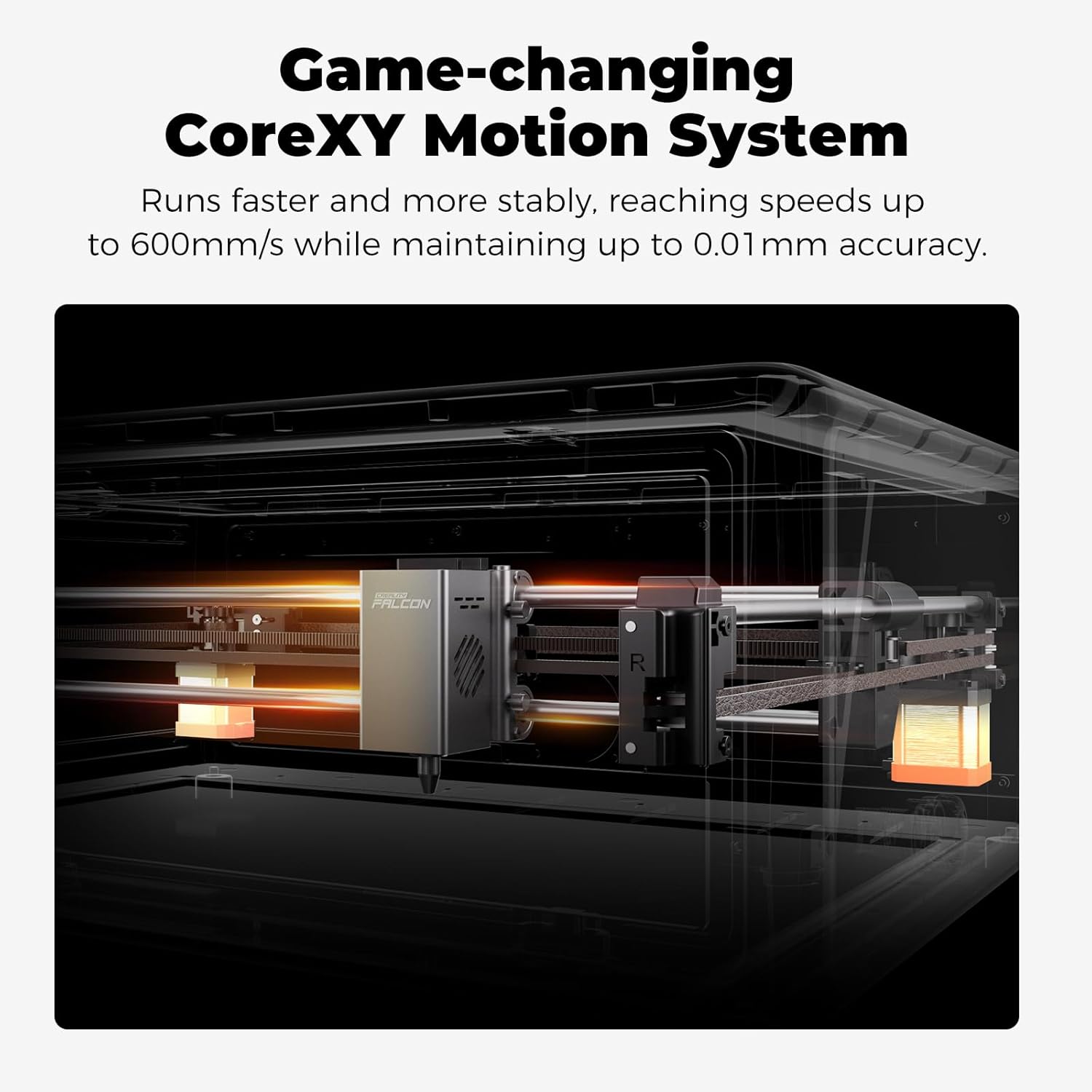
【3 Times Faster】Falcon A1 adopts the latest CoreXY Motion System Technology and Dual Motor Power System, which enables the machine’s engraving and cutting speed to reach 600mm/s, making the efficiency three times that of traditional models.
【Graphic Outline Extraction】Unlock your creative potential with the graphic outline extraction feature. This functionality effortlessly captures and converts your design patterns into detailed engraving paths, enabling you to transform artistic ideas into unique, personalized engravings.
【Class 1 Safety】This engraving machine utilizes a dual-door enclosed design. Its transparent cover not only filters out 99% of laser radiation but also effectively blocks noise and smoke, ensuring a comfortable and safe environment for you. It also comes with auto-lock, emergency stop, and smoke control features.
【Self-developed Engraving Software】The Falcon software offering various editing functions to make your projects truly unique, versatile editing for all design levels. It’s free, smart and easy for anyone to start their creative journey effortlessly. And our machine also supports popular software like LightBurn, LaserGRBL, and Cutlabx.
***IMPORTANT NOTE: DO NOT compatible with the 500 × 500mm honeycomb panel, its working area’s 381 × 305mm. Laser Class 4 and Power Output Level 10000mW.
Please note: This 10W machine is strictly prohibited from engraving highly reflective materials. Prohibited materials include but are not limited to( Mirror-finished metals, mirrored acrylic, etc.) When working with acrylic, the surface must be coated for engraving, and cutting acrylic is not supported. Please consider this before purchasing.
9 reviews for CREALITY FALCON A1 10W Laser Engraver, 80W Enclosed Laser Cutter and Engraver Machine with Air Assist, Smart Camera Positioning, 600mm/s Speed, Smart Material Recognition, Ideal for Wood & Metal
Add a review

$549.00
Brandon Emery-Martin –
Solid, Pre-Assembled Engraver That’s Great for Beginners
Solid Build and Easy to Use — Love That It Comes Fully AssembledThe Creality Falcon A1 came completely assembled right out of the box, which was a big plus. Setup was quick and easy — we were able to start engraving within minutes. The build quality feels sturdy and well-made, with a solid metal frame and smooth operation that gives it a professional feel.It’s also fairly easy to use once you get the hang of the software, and it’s much more beginner-friendly than some other engravers. You can tell some thought went into the design and layout.Overall, a great machine in terms of build and ease of use. Having it arrive pre-assembled really makes a difference, and it feels like a high-quality product that’s built to last.
Spencer kelsey –
The first and affordable laser engraver!
K here’s my thought on this. This thing is one of then coolest things I have ever bought. When it arrived I didn’t even need to to the camera calibration! I love the size and the quality of it. The app is so easy to use. People said the app would crash but I never had a problem. This is so good I am going to buy the pro version of it
R_schleich –
Great for beginners or advanced users
Works awesome!! Great 20w laser! Engraves, cuts, self leveling and great safety features. For beginners or advanced users!
Mike –
Good start, very little helpful information
New to laser engraving, and had been watching and reading a lot of posts about engraving. This went on sale, so I grabbed it.The good:- Easy to setup if you’ve watched some video’s beforehand and have an idea of what you’re doing.- Software is easy to use and get engraving quickly, well for basic engravings.- There appears to be loads of free templates/projects you can download and use. The Creality website has many, once you figure out how to register, and you can download right from the burning software.Some notes:- This only comes with one sheet of wood and that’s used during setup. Have supplies on hand , or just keep burning over what you’ve already done and learn how things work. I did go out to a local shop and grab some wood shapes, a small packet of painting canvas boards and even a square of felt to play with. All did very well!- If you’re going to work on metal, it’s going to take awhile to learn the settings and many burn repeats (like 10 for each item). REMEMBER TO START WITH LOW POWER AND FASTER BURN AND ADJUST AS NEEDED! (you’ll learn that 😉)- If you’re going to burn photo’s (B&W) on wood, it’s going to take ‘hours’ for a 5″x6″ (ish) photo. If you started low power and fast, you’ll probably reburn once or twice over your project.- DO NOT MOVE YOUR ITEM UNTIL IT’S THE WAY YOU WANT. You can keep burning over to make lines darker/deeper, but once you’ve moved your item, good luck getting it back to exactly where it was.The bad (or ‘needs improvement’):- The thick instruction manual is multiple languages, there’s only like 25ish pages in English and they aren’t really helpful.- The manual also points out several areas which need ‘regular maintenance’ but doesn’t say anything about how to do it. I haven’t found what really needs to be done for some items such as the laser unit.- Nowhere does it tell you how to get the software to run on your computer to allow burning. Hint, go to the Creality Wiki page, select ‘Falcon A1’, ‘Software Operation Tutorial’, and ‘Craftseek – Free Laser CNC Files, Graphic Designs, Craft Maker Hub’. From there you can download the Falcon Design Space, install it and get fully setup.- This item doesn’t include a ‘honeycomb’, to protect your base. You’ll engrave random lines on the base without it, trust me 😒. If you don’t have a honeycomb, use the board they included as a base for your projects.- I wasn’t really able to find how high project items can be, but it’s somewhere around 1/4″ tall or less max by default. You can remove the bottom plate with 4 VERY SMALL screws (another gripe, couldn’t they be bigger so you can grab them?) and raise the whole device. They sell legs for this, or use something that holds the device higher.- They are proud of the camera, however it’s ‘still image’ only (at least as far as I’ve been able to find). You have to click a button and it takes a photo. Not very practical to use for project alignment, move, snap, move, snap…Overall, it’s cheap enough to allow you to get into laser engraving and play around. If you’re going to get serious into engraving, you’ll probably want to upgrade at some point.
Anon –
Consistent quality
Works great
Travis –
Don’t bother. Waste of money
Don’t bother. We had it a month before Tyne software started glitching and now it won’t engrave and gets stuck at home. Tried calling customer service- also useless, they tell you over the phone to email your problem rather then help you over the phone. It’s slow, not very user friendly and a waste of money. We have asked for a replacement to fix the defective one or a refund with no success.
Amber –
Love it
It’s a great little machine. Super easy to use
Markese Godley –
Perfect for beginners
Great for beginners. I started engraving things within 30 mins!
enrique olvera –
Compacto y cumple con las especificaciones