

CNCTOPBAOS 1610 PRO CNC Milling Machine,with GRBL Offline Controller,3 Axis Desktop DIY Mini CNC Router Kit Engrave Carving PVC,PCB,Acrylic,Wood Cutting Engraving Machine CNC1610 Pro
$128.00
Related Products



Product description
CNC 1610 Pro CNC Router w/ offline controller
Package include:
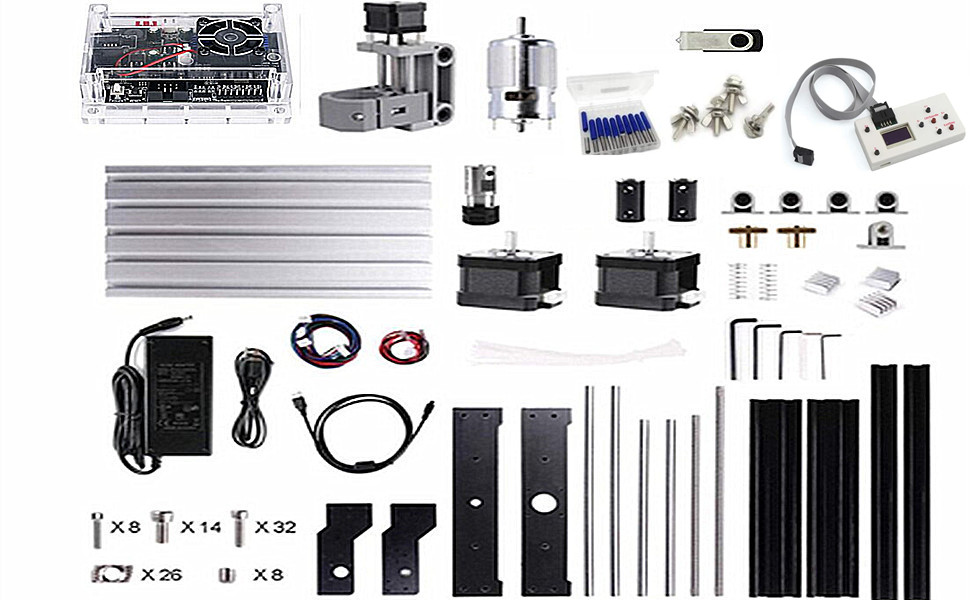
1 set 3 Axis 1610 Pro CNC Router Kit Engraver Machine1x GRBL 1.1f Control Board1x 775 spindle with ER11 collet1x Offline remote controller1x 24V DC Power Supply Aadapter10x 20°0.1mm Drill Bits1Set Allen Wrench1x 4G USB flash drive include english user manual & GRBL software
Specification:
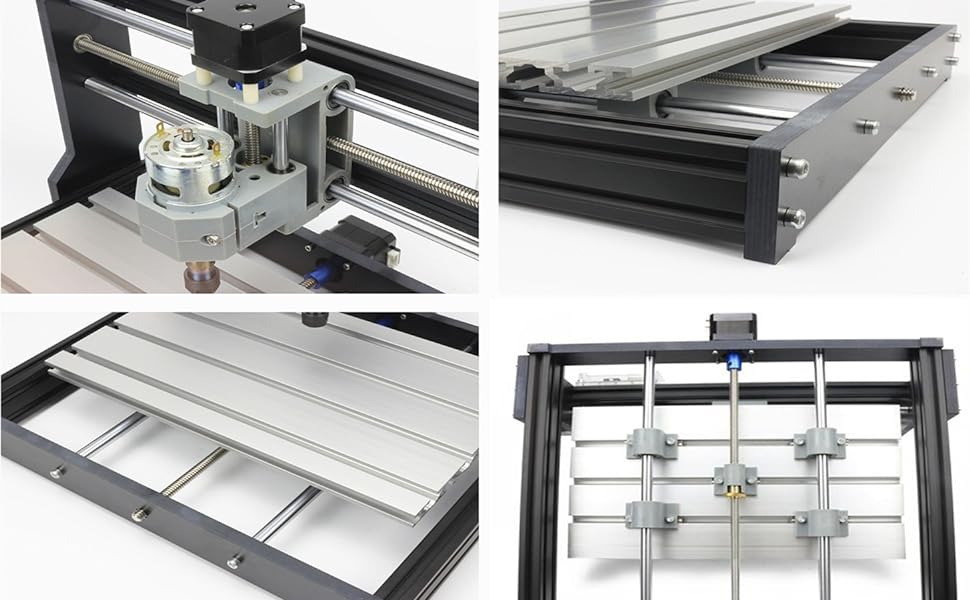
Working area: 18x10x4.5cm (approx.7.08×3.93×1.77 inches)Frame size :30x26x25cm(approximately 11.81×10.23×9.84 inches)Spindle: Diameter 45mm 10000 rpm maximum power 120WMaterial: Aluminum AlloyScrew rod: T8 screw rod, lead 4mm, double copper nut backlashSpindle Chuck: ER11 ColletStep motor: Nema17 stepper motor 1.33A,0.3N.m,43oz-in,42x42x34mmPower supply : 24V 5.6A power adapter (input voltage 110-240V)Support System:Windows XP / Win 7 / Win 8 / Win 10 (32/64 can be)Connection: PC-USB connectionSoftware: GRBL controllerSupporting file:G-code (.nc/.txt/.tape/.gcode)Processing accuracy:About 0.2mmSpindle PWM speed: Support;power 0-100% adjustable

775 Spindle Spindle parameters: 775 spindle motor (12-36V) 24V:10000r/minMounting hole diameter: M4 screw hole; Mounting hole pitch: about 29mm.Motor shaft diameter: 15mm; Motor diameterDrill clamp parameters: ER11-3.175mm ( can be replaced 0-7mm )Control software: grbl control(candle)Supporting files: G-code (.nc/.txt/.tape/.gcode…)Processing accuracy: About 0.2mmMachinable material: Wood、 plastic、 PCB、 PVC、 carbon fiber、 acrylic、 density board etcPower: DC 24V 5.6A power adapter (input voltage 110-240VAC)

GRBL controller board Connection: USB (USB-CH340)Software: GRBL controller, UniversalGcodeSenderInput voltage: 12-24VDCMaster chip: atmel 328P (arduino nano)Spindle drive chip: MOSFET (recommendation 24V, current : within 10ASpindle PWM speed: SupportSupport stepper motor: 12V, maximum current of 2A or less is recommended within 1.5A and additional heat. (Any stepper motor Nema17/Nema23)Power Interface: 5.5-2.5mm DC interfaceSupport 3-pins module: support 0.5W-20W moduleSupporting file:G-code (.nc/.txt/.tape/.gcode)

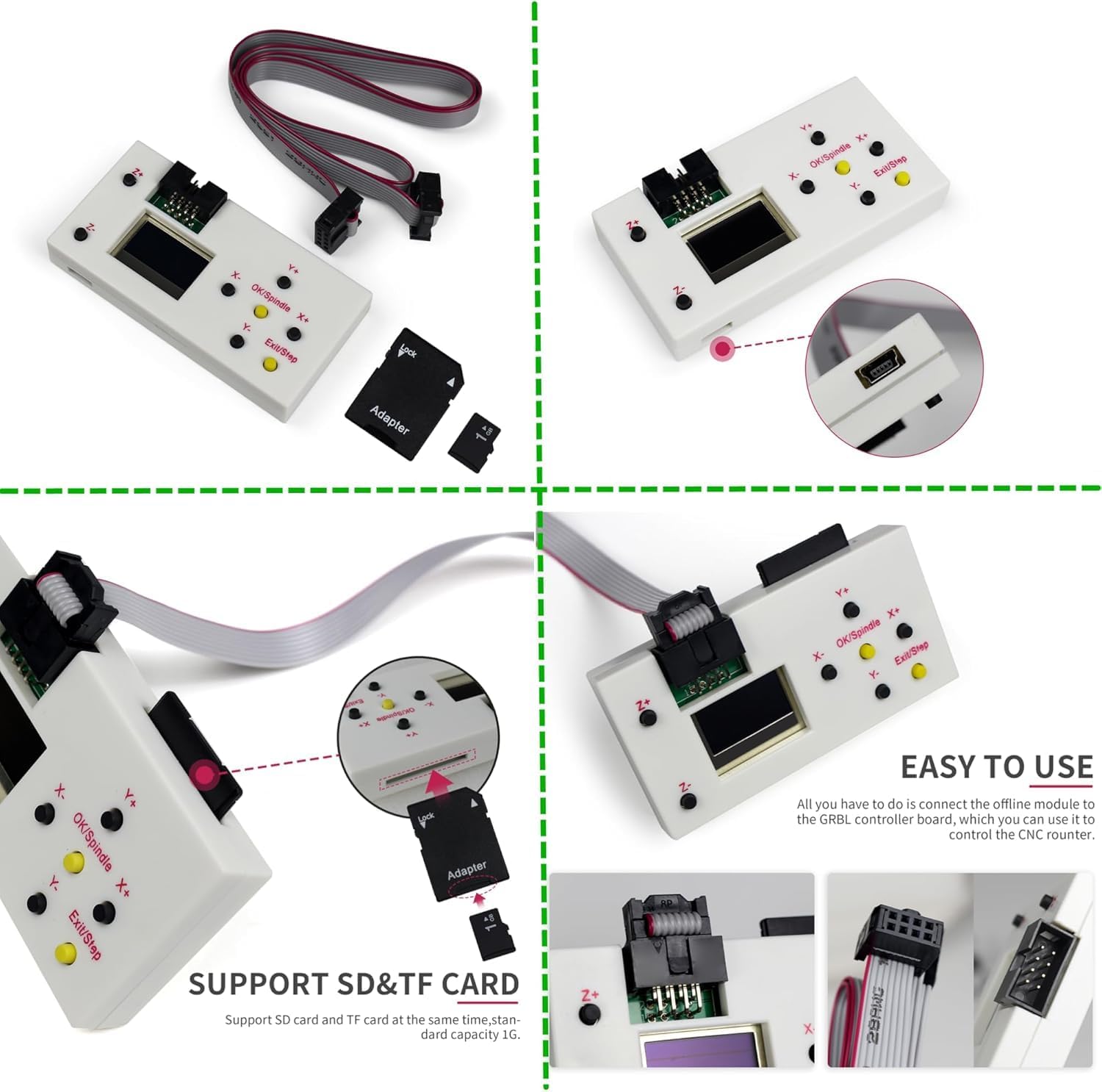
GRBL offline control Support SD card and TF card at the same time, standard capacity 1G.With this offline controller module, you can directly control the CNC router without connecting it to your computer.After inserting the file into the SD card,the engraving file can be directly identified. You can also use the micro USB cable to connect the offline hand controller board to your computer and save the file directly.Manually control: manually adjust X,Y,Z axis location as engraving starting point,manually open or close spindle,manully open or close cooling fanFile engraving: after off-line controller save file, it can connect the GRBL control board and process engraving,no need to connect PC computerSave file: after the off-line controller connect PC,it will be recognized as USB,large capacity storage device, can access engraving file directly.SD shows it is SD card condition,turn on power supply after insert SD card,otherwise,it won’t work.SD card capacity 4G could be recognized.

Advantages
Support oftware: GRBL controller,Candle, UniversalGcodeSenderAdd emergency stop button port,tool probe port and XYZ limit port.Power supply:12-24V DCThe spindle supports 0-100% adjustable PWM power.Support limit switch, tool setting, steering gear, cooling fan and other functions.Support PWM / TTL signal control, power 0-100% adjustable!Increase the power button switchCancel the drive module,integrate the imported stepper motor drive,no need to worry about module damage. And integrated heat dissipation aluminum alloy.Add offline recognition function, you can insert offline module and computer at the same time. The machine will automatically recognize whether it is controlled by the computer.Enhanced spindle drive.can support 20,000 rpm spindle.Add the fan port to force heat dissipation
Add Offline controller

GRBL Offline Controller
Main Page
Ctrl: Machine Control; File: Use the Gcode file; Press [Y+] [Y-] to select; Press[Ok] to Enter
Control Page
X± Y± Z±: Moving AxisOK/Spindle: Spindle ON/OFFExit/Step: Change Step/Exit (long press)How to increase the spindle power: After pressing the spindle button, press and hold the OK button and the Z+ button simultaneously to increase the speed.How to decrease the spindle: After pressing the spindle button, press and hold the OK button and the Z- button simultaneously to decrease the speed.
File Page
Common supported formats include nc. tex. tap.Press [Y+] [Y-] to select filePress [Ok] to EnterPress [Ok] to begin if you are readyNote:Long press [Exit] to stop machining

Add emergency stop button port, probe port and XYZ limit port.Add the outer casing: protect control board in transit,to avoid short circuit problem during use;Add the power button switch;Cancel the drive module,use integrated imported stepper motor drive,with short circuit protection,and integrated heat dissipation aluminum alloy;Add the fan port to force heat dissipation;Add offline recognition,can insert offline modules and computers at the same time.Offline will automatically identify if there is computer control.Enhanced spindle drive,can support 20000rpm spindle.support more powerful spindle.Improved USB interface: the original USB interface is patch soldering, transport collision and improper use, easy to drop, now changed to plug-in, very strong;The spindle drive increases the optocoupler isolation, which makes the control board generate less heat, and the spindle speed adjustment is more linear and safer.

Add the function of X/Y/Z axis limit switches,optimized the XYZ limit port and the port connected to the device,making wiring and operation easier.After installing the limit switch, when the XYZ axis moves beyond the travel of the engraving machine, the limit switch will trigger the machine to automatically stop the movement.Add the function of emergency stop button,this function can be used when an emergency stop is required at work, making our work safer and more efficient.Add the power button switch and move the power switch button from the bottom to the side,simple operation,more safety in the process of using the machine.

The control board support two engraving methods,our package comes with a spindle motor but without the module in the picture above.
Q&A
Q: What materials can the milling cutter generally engrave or cut?
A: Wood, acrylic (acrylic), pcb, pvb, soft metal, iron, glass, stone etc.
Q: What thickness of wood or acrylic can generally be cut by module?
A: 3-5mm wood board (acrylic), speed setting 100, power setting 1000;
Multiple cuts can cut 12mm wooden boards by spindle.

CNC 1610 Pro Mini CNC machine small size, light weight, USB interface, GRBL control systems, great cnc router machine for beginers;1610 Pro cnc machine is very easy to install,stable structure.Main application:can be engraved plastic, wood, acrylic, pvc, pcb, wood and the like material;soft metal like copper and aluminum and other materials, but can not carve hard metal, jade or other very hard texture of the items.if you change the spindle to a 3pins module,also can carve the kraft paper, wood, leather(wallet), bamboo.

Q: The X,Y and Z axis of the machine cannot be moved,what should I do?A: First check whether the wires are correctly connected, whether the power switch of the control board is pressed, and then check whether the coupling is off.Q:What should I do if the control board cannot be connected?A:Exit the software, unplug the wire, and reconnect it. Or update the firmware.Q: How to modify the parameters when the limit switch is activated?A: Enter 21=1 and 22=1 commands.Q: The engraved image is reversed,what should I do? A: Enter 3=2 or RST=*command

Our parcel include a 4G USB flash drive,you can download the english user manual and GRBL software from the flash drive.File formats supported by the software: *.nc, *.ncc, *.ngc, *.tap,*.txt and *.cnc.Software used to create Gcode: Carbide Create, Artcam, MeshCam, Fusion360, Inkscape etc.
Model: Upgrade Version 1610 Pro; With White Offline Controller,you can operate this machine without connect to the computer; offline controller included a SD card reader to write into the root directory G-code files or NC file; Support manually adjust X, Y, Z axis location as engraving starting point,manually open or close spindle
Working area: 7.08×3.93×1.77 inches/18x10x4.5cm ; Frame size: 11.81×10.23×9.84 inches/30x26x25cm; Type:USB port Desktop cnc router; Spindle: Dia 45mm 10000rpm max power 120W; ER11-3.175mm can be replaced 0-7mm collet; Nema17 42 stepper motor 1.3A/0.3N.m/42x42x34 mm
Upgraded GRBL1.1f Control Board: Added the outer casing,emergency stop button port,tool setting/probe port,X/Y/Z axis limit port and add the power button switch,and come with the fan port to force heat dissipation,with enhanced spindle drive,can support max 20000rpm spindle,and also can support 12V 3-PIN 0.5W-20W engraver module
Supporting files:G-code nc/txt/tape/gcode; Main application: Can be engraved plastic, wood, acrylic, pvc, pcb, wood and the like material,and soft metal like copper and aluminum and other materials etc
GRBL Software: Our parcel include 4G USB flash drive,pls download the installation instructions,user manual and GRBL software from the USB flash drive; System requirements: Windows XP SP3,Win 7,Win 8,Win 10 32/64 can be and Linux
13 reviews for CNCTOPBAOS 1610 PRO CNC Milling Machine,with GRBL Offline Controller,3 Axis Desktop DIY Mini CNC Router Kit Engrave Carving PVC,PCB,Acrylic,Wood Cutting Engraving Machine CNC1610 Pro
Add a review

$128.00
Charles Hasse –
Its precision and reliability are remarkable, making complex projects a breeze.
The setup process was straightforward, and the user-friendly interface allows for smooth operation. The machine runs quietly and produces high-quality finishes on various materials. I have noticed a significant increase in my productivity since I started using it. Overall, this CNC milling machine is an excellent investment for both hobbyists and professionals looking to enhance their machining capabilities. Highly recommended for anyone in need of a dependable milling solution!
Karen Z –
steep learning curve
Assembly was pretty easy and I liked the off line control mechanism to test function as well as the included micro sd card to download cutting instructions. Make no mistake, this is a hobbyist grade tool. Perfect for learning cnc on a budget. Good for cutting wood and plastic. It also works as on over head pin router for inlay work.
Keypad loosing, finger prints on the supost brand new laptop , don’t buy looks to be refurbished, scamming –
Good quality
All good , 👍 no complaints, work perfectly as is supposed to be, just needs sheetcam i buy it 150 bucks you will need it
Evo Jeckel –
Very small
This little machine is very small. Easy to put together. I got instructions for a 3018 cnc and not a 1016. You will outgrow this very fast or just give up learning.
Bob –
It’s CRAP
It took me over 5 hours to put together, the instructions are terrible, no written instructions just pictures and including the wiring was confusing. the software is crap. after over 5 hours I dissembled and sent the crap back.
RJ –
Not for a first timer
My 1610 came with a 2016 manual that does not give the right setup measurements. Still trying to find the proper manual online and in groups. Not very much help available for this one. A 2016 is more popular and it is what I will buy sometime in the future. This is a learning toy but there is no book to learn from that I can find.
Colin –
Great value but not for total newbie.
Had a problem with the linear bearing which is resolved by myself, but seller is helpful and respond is prompt. Must have some basic mechanical intuition and be expected to pick up diagnostic skills, which is a requisite anyway no matter which machine you decide to purchase. No fundamental issue with the machine design, great value for money if you know how to work around it.
Quinn Trejo –
Bad assembly instructions, but good quality for price
The instructions are really bad, they show assembling the unit, but don’t show that you have to install the T-slot nuts until the next page. Also, the t-slot nuts were a bit tight, but scraping a few times on either side with a file was enough to make them work. All the couplings are held purely by friction, which is somewhat concerning, but not a real problem considering the size and price of this thing.
Bald Guy –
What a nice surprise! The item arrived quickly in a good package. All is well placed in styrofoam. Comes with clear english instructions. Even without a manual, it’s pretty easy to figure out how to assemble.Comes with all screws and tools (Allen keys). The frame is made of think and strong Bakelite and all the extruded parts are aluminium; some natural, the rest is black. The spinder holder and assembly is molded injected plastic but very strong.Motors are nema 17 and are quiet in operation. The controller comes with the CNC and is really to install and configure. Software is on an USB key provided.Took me about one hour to assemble and setup.The only this is the power and quality of the motor. This is a very common cheap brushed motor, nothing to call your mother about. The mount however, would allow you to change for a Dremel or another more powerful motor.Than being said, you also have an option to put a laser module as the conector is already provided on the controller.Good bang for the buck !
PapaCarlosoMtz –
Funciona excelente y es justo lo que necesito para crear pcb de mis prototipos para mis hobbies
Client d’Amazon –
J’ai aimer la machine mes le programme me semble pas fonctionner donc je doit vérifiée si c est le pro l’aime…
Verulo Fajardo –
Útil pero las puntas se desgastan rapido
NicoleKiefer –
First look was nice, but problems started with a corrupted flash drive, leaving me without instructions or software. Since there isn’t a brand name, finding those online was a hustle. Once I finally assembled it and found software for it, I ran into a new problem. About two minutes into my first engraving the Y-axis started to slip and even disconnect from the step motor. It took several tried, locktide and a husband to get it working, but it squeeks a lot now. I got two or three very simple test engravings done, then the X-axis began to slip (see video) so now I have to get that one fixed. On top of that I also had to fashion my own clamps, since there weren’t any with the machine. The bits coming with the machine where also a little disappointing since it’s just ten bits of the same kind. All 20° v cut, limiting the kind of engraving you can do until you order additional bits.Now that I managed to have the machine working, the results are quite good, especially considering that it is my first encounter with CNC. As troublesome as the machine was in the beginning, the customer service was excellent. The company picked up the costs for making it work and is sending out the missing clamps. I do think it’s a good machine to start with and figure out if cnc is for you. And just because mine was a bit trouble doesn’t mean they all are.