

TP-Link BE3600 Wi-Fi 7 Portable Travel Router TL-WR3602BE | Dual-Band, 2.5 Gig Port, USB 3.0 | Multi-Modes in One | OpenVPN, WireGuard® | Public WiFi Sharing for Hotel/Cruise/RV/Plane | No 6 GHz
$13.49
Related Products


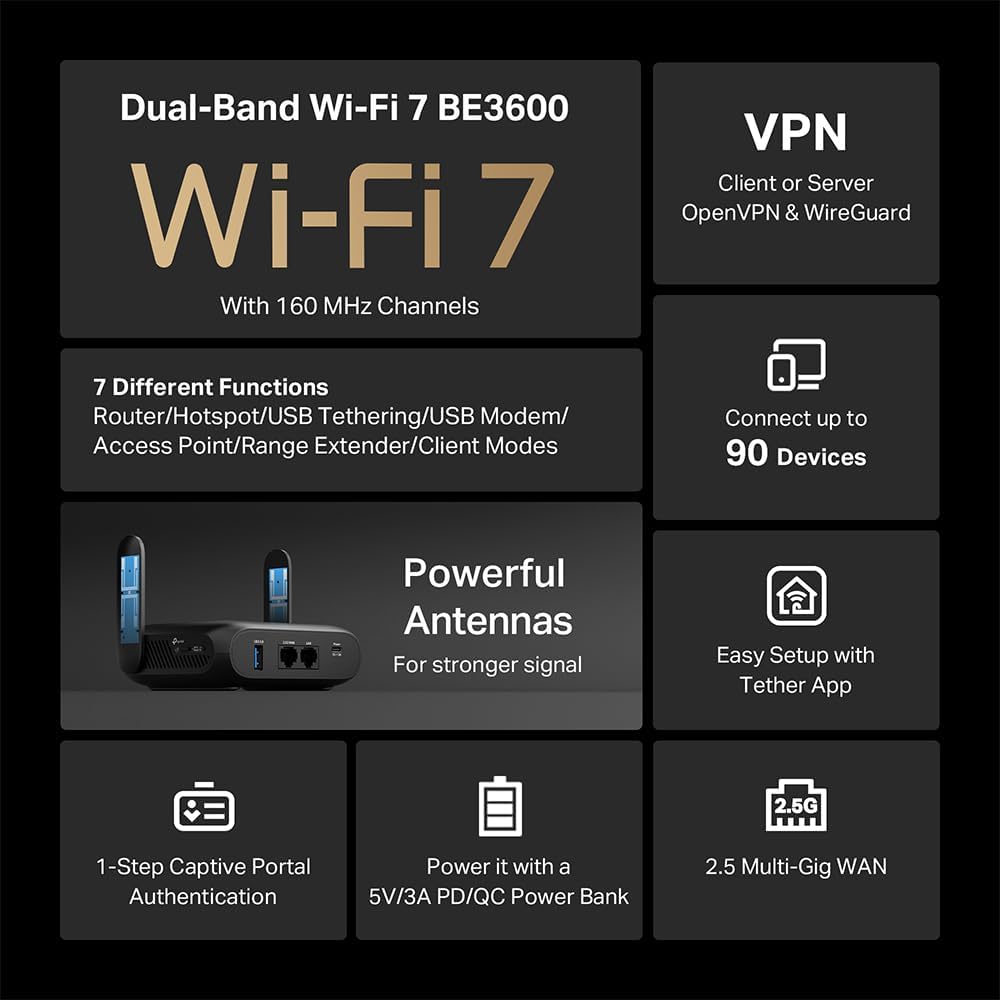


Secure High-Speed Wi-Fi 7 On The Go
With the compact and powerful TL-WR3602BE, you can create your own personal WiFi network on the go. With WiFi 7 technology, you can enjoy more capacity for connected devices and faster wireless speeds. With a 2.5Gbps WAN port, a 1Gbps LAN port, a USB 3.0 port, and a Type-C power port, TL-WR3602BE is an ideal solution for on-the-go connection. Whether you’re traveling for work or leisure, attending conferences, or need a reliable connection at a cafe or hotel, this portable router is designed to keep you connected.
This router offers various modes for flexible internet access wherever you go. Router Mode creates a private WiFi network using internet from Ethernet, USB tethering (phone connections), or a 3G/4G/5G USB modem for internet access. Hotspot Mode creates a private WiFi network using internet from public WiFi. In AP, RE, or Client Mode, you can add wireless access to wired networks (Access Point), extend existing WiFi coverage (Range Extender), or connect wired devices to WiFi networks (Client).
It adapts to most situations. With support for Router, USB Tethering, 3G/4G/5G USB Modem, Hotspot, Access Point, Range Extender, and Client functions, TL-WR3062BE is perfect for homes, hotels, Airbnbs, cruise ships, RVs, or campsites.
Plug in an external hard drive via USB 3.0 to back up or share files across your private network. For added privacy, enjoy advanced encryption and authentication with OpenVPN and WireGuard VPN protocol support, keeping your connection secure wherever you are. Additionally, this router comes with HomeShield, a TP-Link subscription service on the Tether app that keeps your home secure and your family safe. It offers advanced security and easy parental controls, all managed from your phone. Free features include Quality of Service (QoS), blocking specific websites, and content filtering by URL.
𝐁𝐄𝟑𝟔𝟎𝟎 𝐃𝐮𝐚𝐥-𝐁𝐚𝐧𝐝 𝐖𝐢-𝐅𝐢 𝟕 𝐓𝐫𝐚𝐯𝐞𝐥 𝐑𝐨𝐮𝐭𝐞𝐫 – Experience blazing-fast speeds and enhanced network capacity. Delivers up to 2882 Mbps on the 5 GHz band and up to 688 Mbps on the 2.4 GHz band. Enjoy uninterrupted video streaming, downloads, and gaming across up to 90 devices. ◇ 𝐏𝐥𝐞𝐚𝐬𝐞 𝐧𝐨𝐭𝐞 𝐭𝐡𝐢𝐬 𝐦𝐨𝐝𝐞𝐥 𝐝𝐨𝐞𝐬 𝐧𝐨𝐭 𝐬𝐮𝐩𝐩𝐨𝐫𝐭 𝟔 𝐆𝐇𝐳 𝐁𝐚𝐧𝐝
𝐂𝐨𝐧𝐧𝐞𝐜𝐭 𝐀𝐧𝐲𝐰𝐡𝐞𝐫𝐞, 𝐀𝐧𝐲 𝐖𝐚𝐲 – Offers (1) Router Mode for Ethernet or USB (phone) tethering connections, (2) Hotspot Mode for secure access to public WiFi , and (3) AP/RE/Client Mode to extend WiFi, add WiFi to wired setups, or connect wired devices wirelessly.
𝐌𝐮𝐥𝐭𝐢-𝐆𝐢𝐠𝐚𝐛𝐢𝐭 𝐂𝐨𝐧𝐧𝐞𝐜𝐭𝐢𝐯𝐢𝐭𝐲 – 1x 2.5 Gbps WAN and 1x 1 Gbps LAN ports, along with WiFi 7 speeds, enable fast wired and wireless data transmissions.
𝐎𝐮𝐫 𝐂𝐲𝐛𝐞𝐫𝐬𝐞𝐜𝐮𝐫𝐢𝐭𝐲 𝐂𝐨𝐦𝐦𝐢𝐭𝐦𝐞𝐧𝐭 – TP-Link is a signatory of the U.S. Cybersecurity and Infrastructure Security Agency’s (CISA) Secure-by-Design pledge. This device is designed, built, and maintained, with advanced security as a core requirement.
𝟐𝟒/𝟕 𝐒𝐞𝐜𝐮𝐫𝐞 𝐒𝐮𝐫𝐟𝐢𝐧𝐠 𝐰𝐢𝐭𝐡 𝐕𝐏𝐍 𝐄𝐧𝐜𝐫𝐲𝐩𝐭𝐢𝐨𝐧 – Protect your network with OpenVPN and WireGuard support for both VPN client and server. Enjoy private, secure browsing on public Wi-Fi, with PPTP and L2TP protocols also supported. 𝐏𝐥𝐞𝐚𝐬𝐞 𝐧𝐨𝐭𝐞 𝐭𝐡𝐢𝐬 𝐦𝐨𝐝𝐞𝐥 𝐝𝐨𝐞𝐬 𝐧𝐨𝐭 𝐬𝐮𝐩𝐩𝐨𝐫𝐭 𝐎𝐩𝐞𝐧𝐰𝐫𝐭
𝐎𝐧𝐞-𝐒𝐭𝐞𝐩 𝐂𝐚𝐩𝐭𝐢𝐯𝐞 𝐏𝐨𝐫𝐭𝐚𝐥 𝐀𝐮𝐭𝐡𝐞𝐧𝐭𝐢𝐜𝐚𝐭𝐢𝐨𝐧 – Log in once on the Tether App to easily create a secure private network from public W-Fi for all your devices. No repeated logins needed
𝐌𝐮𝐥𝐭𝐢𝐩𝐥𝐞 𝐖𝐚𝐲𝐬 𝐭𝐨 𝐏𝐨𝐰𝐞𝐫 𝐘𝐨𝐮𝐫 𝐑𝐨𝐮𝐭𝐞𝐫 – Power the TL-WR3602BE via its USB-C port using the included adapter or any 5V PD power source like a power bank
𝐃𝐮𝐫𝐚𝐛𝐥𝐞 𝐚𝐧𝐝 𝐂𝐨𝐦𝐩𝐚𝐜𝐭 𝐃𝐞𝐬𝐢𝐠𝐧 – Designed for travel, the portable TL-WR3062BE easily fits in your bag for on-the-go connectivity. Great for travelers, campers, RV owners, remote workers, gamers, and more
𝐌𝐮𝐥𝐭𝐢-𝐋𝐢𝐧𝐤 𝐎𝐩𝐞𝐫𝐚𝐭𝐢𝐨𝐧 (𝐌𝐋𝐎) – Frequency bands are combined to deliver enhanced throughput, lower latency, and improved reliability. Enjoy faster, more stable connections across applications. △
11 reviews for TP-Link BE3600 Wi-Fi 7 Portable Travel Router TL-WR3602BE | Dual-Band, 2.5 Gig Port, USB 3.0 | Multi-Modes in One | OpenVPN, WireGuard® | Public WiFi Sharing for Hotel/Cruise/RV/Plane | No 6 GHz
Add a review

$13.49
Aaron Harstine –
THE Travel Router
I recently picked up the TP-Link BE3600 Travel Router and I couldn’t be happier with it—definitely a 5-star product! It’s been amazing to have a secure connection everywhere I travel, giving me peace of mind whether I’m in a hotel, Airbnb, or airport lounge. The setup is super simple, and managing it through the Tether app makes everything a breeze.One of my favorite features is having a network-side VPN when traveling. It’s great not having to configure each device individually, since everything connected to the router is automatically protected. Plus, I love that my family and I can connect all our devices without having to log each one into hotel Wi-Fi separately—our network stays the same wherever we go.If you’re looking for a reliable, secure, and easy-to-manage travel router, the TP-Link BE3600 is a fantastic choice. Highly recommended!
David –
Nice
Very awesome router fast not bad to setup and works well
cinest –
TP-Link AC 1200 A6 revised review
Cons: At first I couldn’t get it to work:1) the app isn’t very intuitive in helping to set it up, and the app didn’t see/find the router, again and again. It was very frustrating.ADVICE: Once you downloaded the app and when you see “No device found” message, don’t bother with refreshing the screen (as suggested by the app). Instead, press the large + sign in the upper right corner of the app screen, then it will take you easily all the way through. App’s developers should fix this flaw, in my opinion.2) it takes a long time for the router to “warm up” before all 4 green lights become steady – I’m referring mainly to light #5, from left to right (there are 6 of them, #s 1,2,3, and 5 should be steady green). It took maybe 7 min or longer for that light to become steady. That’s too long, in my view. Yet, it will work.ADVICE- plug in the cable from the modem, turn on, and leave it for a while.3) I’m yet to remove all plastic wrappings of the four antennas – one is fully unwrapped and one other only partially. Why? It is really “sticky” or tight, and I’m yet to figure out how to remove the plastic without scratching the antennas.ADVICE: maybe just leave it alone. The router works just fine with some antennas wrapped in plastic. Had I known that, I’d have left the wrapping alone because it still looks pretty and tidy with the plastic, like a second skin. But now I have to finish unwrapping because it looks ugly.4) The tech support is dismal. You are either put on hold forever or you get silly and unhelpful questions from the chat tech support with periods of long wait in between.ADVICE: don’t count on it.All in all, I’m holding off my original, frustration-based desire to return the router to Amazon (I love Amazon!!!).Pros:1) it provides a very strong signal, so far two weeks in a row, flawlessly, at 40-60 mbp down/20-30 up, depending on the source conditions/traffic, I guess, because on good days it is 106 / 57. I have four devices on, by the way.2) Coverage – unbelievable for this device: my place is 12,000 sq ft. In any room, any location, including bathroom and so on, the signal is strong (My Mac indicates no loss in signal strength, but my chromebook points to the reduction in the number of bars: 5 in the kitchen, 4 in the bedroom, 3 on the patio; but the speed test indicates no deterioration in speed; not sure what to make of that). The router is in the kitchen, and no impact on the signal despite all appliances around. The kitchen is in the central location of the house. Also, In the garage, which is below the living floor, – the signal is great everywhere. In addition, which is like, mama mia, the signal is strong in the back of the backyard (40x25ft), too. That means that the router covers 12000+1000 sq ft. !!!. No need to buy more expensive router.3) The router is silent – totally so.4) Good looking device – shiny, black, rather small and unobtrusive footprint. Really nice to look at. It sits on metal shelf of the kitchen “buffet.”
Ej –
Best router for a good price!?
Bought this to replace my nighthawk. The app and setup is easy, connects all my devices well. Great quality all around, I’m definitely a huge fan of this router and its speeds.
David –
Good Value for Wifi7 (sortof)
Wifi 7 sortof… not a 3 band but 2 band router. It is very fast compared to the AX1800 I replaced. My last 3 setups have been TP Link products and always have had good value/performance with them. The only disappointment is to use the upgraded security features requires a subscription now. I won’t be doing that as I am using basic router security and always on a VPN whether home or away. This is a very good value if you want to insure being up to standard protocol for some time to come. My home is a ranch 1800′ and the reach upstairs and downstairs is strong. The router has performed flawlessly since being installed.
Michael W. –
Simple, affordable, fast and probably the best solution for 85% of people out there/ non-enthusiasts
TLDR: I think Tom’s Hardware Guide said it best “Bringing Wi-Fi 7 to the masses… The TP-Link Archer BE3600 is cheap, but you also don’t get the full spec of features or performance of “true” Wi-Fi 7 routers”. If you’re not big into gaming and just want a no-frills router to support your 1 Gbps or lower internet connection, there’s nothing wrong with the Archer BE3600. I personally, am very happy with my purchase and it’s probably the best solution for 85% of people out there/ non-enthusiasts. NOTE: I paid $83 for this Wifi router using an Amazon coupon. Which I think is a very fair price for something I only plan to upgrade every 5-7 years, and only if I have to. I also live in a townhouse, so it’s not like the signal has to go 60+ft.Details:Upgrading from a TPLINK AC1750 (Archer A7) [release ~2018], using Comcast internet (Fast plan; up to 600 mbps down) and a Netgear AC1200 WiFi USB Adapter 802.11ac Dual Band, USB 3.0 (on my computer but in a USB 2.0 port) which was about 7 feet away from the wireless router and I saw a measurable increase in my download speeds (~45% from ~260mbps to ~380 mbps using Ookla speed test).Purportedly the TP-Link BE3600 which was released in the 2024/2025 timeframe uses the same frequency bands (5 GHz and 2.4 GHz bands) as the older TPLINK AC1750 (Archer A7), but uses the newer and faster WIFI 7 (802.11be) vs the older WIFI 5 (802.11ac) protocols. The TP-Link BE3600 advertises up to 3.57 Gbps (aka 3570 Mbps; 2882 Mbps in 5 GHz band + 688 Mbps in 2.4 GHz band) whereas the Archer A7 only 1.75 Gbps (1300 Mbps in 5GHz + 450 Mbps in 2.4 GHz bands).Practically speaking the internet says anything above 100 Mbps should be able to run multiple devices pretty well streaming. But I’m upgrading anyway, because my mother needs a new router so she doesn’t have to pay $10/mo for one from the cable company.I have no complaints. Easy to setup and connect to. I realize I’m now probably being gated by my older Netgear AC1200 WiFi USB Adapter which is using a USB 2.0 port (max speed 480 mbps) but my speeds are enough for me; my newer gaming PC which sits about 10 ft away from the router and uses a built-in WIFI card (Wi-Fi 6E 802.11ax) manages ~500 mbps down.CAVEAT: I do want to note my older Netis WF2120 Wireless N150 Nano USB Dongle 802.11 b/g/n (aka WIFI 1/3/4) on an older computer was not able to see the 2.4 GHz signal from the BE3600 whereas it could from the AC1750; so I replaced it. I ended up using a spare Wavlink 600M dual-band connectivity (2.4GHz and 5GHz) USB WiFi adapter which uses 802.11ac WIFI 5; and had to update the drivers on my older windows PC in the process (to recognize the Wavlink adapter).
Enrique V. –
El producto llego bien en su empaque y con todos sus accesorios.Facil gestion y administracion.Trae varias opciones para conectar tus dispositivos.1. Para conectar tus equipos Laptop, Celular.2. Para conectar equipos IoT como son Focos, apagadores, sensores aquellos que aun usan banda 2.4Ghz.3. Para invitados.Por ahora todos mis equipos funcionan correctamente sin desconexión.La velocidad mejora considerablemente y alcance, viniendo de un Router HW.5200.Puedes conectar un disco para funcion como NAS.
MicGov –
I switched over to a new router as my old one was overheating and not reaching my full speed through the ISP. this router allows everyone in the house to connect their devices and it doesn’t slow down at all. A good buy.
Mohammed H. T. –
Very good no issues so far
Reynante –
good
daniel vallee –
j`utilise ce routeur pour utilisation domestique présentement il fait bien le travail j`ai 2 tv box iptv et 1PC qui fonctionne simultanément et il me fourni le 5G sur les 3 appareils avec une connexion 100Msbs en réseau et environ 110 Msbs en Wifi plus la téléphonie IP pour 70$ il fait bien le travail ça fait seulement 30 jours que je l`ai reçu et il va bien j`ai fait 1 redémarrage depuis 30 jours pour un léger bug mon FAI fourni les même routeurs et semble dire que c`est un bon routeur il est facile à configuré sur un PC car ont peut lui émettre plus de fonctions avec une belle interface bien détaillé. Avec l`APP. il y a moins de possibilité pour la configuration avec sa fonction MU-MIMO il choisi selon la distance ( fonction intelligente) si il donne du 5G ou du 2.4G mais il y a une possibilité de lui accrédité la fréquence que l`ont veut en ce servant de la fonction invité si l`on veut absolument une fréquence pour un appareil en particulier. Pour le moment il va bien j`ai hâte de voir la durabilité de ce routeur. Pour ce qui est des antennes il mesure environ 10 PO pour une meilleur réception pour le moment TP-LINK est mon préféré.