

SCRIB3D P1 3D Printing Pen with Display – Includes 3D Pen, 3 Starter Colors of PLA Filament, Stencil Book + Project Guide, and Power adapter
$34.99
Related Products


Product description
SCRIB3D Video
The video showcases the product in use.The video guides you through product setup.The video compares multiple products.The video shows the product being unpacked. Scrib pen intro Merchant Video
 Affordable 3D Creation Tool for Ages 14+ Unleash Your Imagination with the SCRIB3D P1 3D Pen
Bring your imagination to life with the versatile and high-quality SCRIB3D P1 3D Pen. Perfect for creative projects and developing artistic skills, this pen offers precision with stepless speed control. Unleash your creativity and turn ideas into reality with the SCRIB3D P1.
 Effortless Creativity
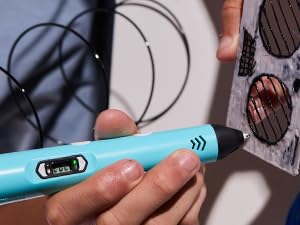
Plug in, insert a spool of filament and in moments you’ll be ready to design 3D wonders.
 Great Gift Idea
A unique gift idea for anyone that loves crafts, creativity and screen-free fun.
 Practical Tool
From crafting personalized gifts to DIY home fixes and beyond, this lightweight, easy-to-use pen is a must-have for your creative toolkit.
 Smart Tech
The integrated LCD screen ensures you’re always in control allowing for real-time temperature and speed adjustments.
SCRIB3D P1 3D Printing Pen
Model Name SCRIB3D P1 Temperature Range PLA (160-210℃, 320-410°F), ABS (210-235℃, 410-455°F) Colors 3 Colors of PLA Plastic Size & Weight 4.61 x 7.87 x 1.97 inches; 14.39 Ounces Compatibility ABS/PLA compatible Power Input: 100-240V AC, 0.5A MAX, 50-60Hz. Output: +5V DC, 2A Display LCD Screen with LED Power & Temperature Indicator Lights Warm Up Time 2-3 Minutes Nozzle Removable Ceramic Nozzle with Anti-Clogging Features Filament Length 30 Feet Safety Information WARNING! Pen tip is HOT and can burn you
Compare 3D Printing Pens
Add to Cart
Add to Cart
Add to Cart
Add to Cart
Add to Cart
Customer Reviews
4.4 out of 5 stars 19,776
4.3 out of 5 stars 3,149
4.6 out of 5 stars 312
4.5 out of 5 stars 397
4.9 out of 5 stars 25
4.7 out of 5 stars 24
4.5 out of 5 stars 32
Price
$34.99$34.99
$59.99$59.99
$47.46$47.46
—
—
$68.38$68.38
$19.99$19.99
Description
Top 3D pen w/ extra filament
Pro-level doodling pen
3D Pen + 328ft Refills Bundle
3D Pen + 230ft Refills Bundle
3D Pen + 10 Refills Bundle
3D Pen + 20 Refills Bundle
3Doodler Tri-Color Filaments
Filament Colors
10 Assorted
3 Assorted
23 Assorted
23 Assorted
22 Assorted
22 Assorted
18 Assorted
Filament Amount
30 Ft (9 m)
20 Ft (6 m)
358 Ft (109 m)
230 Ft (70 m)
348 Ft (106 m)
220 FT (67 m)
197 FT (60 m)
Included Filament Type
PLA
PLA
PLA
PLA
PLA
PLA
PLA
Anti-Clogging Capabilities
✔
✔
✔
✔
✔
✔
✔
[FOR CREATIVE PROJECTS] Create, draw, doodle, and build in 3D with this versatile, high-quality 3D pen. The SCRIB3D P1 enhances spatial thinking, creativity, and artistic skills. Ideal for collaborative projects, handmade creations, decorations, or everyday repairs. The P1 features a stepless speed function for precise control, whether working on detailed designs or faster infill tasks.
[READY-TO-USE KIT] Includes 3 colors (30 feet) of PLA plastic to keep you Doodling for ages, as well as a power adapter, step-by-step manual, and a free stencil guide. Just plug in, heat it up and enjoy the fun of creating three-dimensional masterpieces. PLA is a versatile, easy-to-use printing plastic that is great for both first time and advanced users.
[BEGINNER FRIENDLY] Plug the adapter into the back of the pen and choose your filament. The red light will turn on indicating warm up, this will take about 2-3 mins. Double click the forward button to start and feed the filament through the back of the pen. Once the filament has reached the nozzle of the pen, click forward to stop. Press and hold the forward button or double click for a continous flow. Once you have completed your design, press and hold the reverse button to retract filament.
[MULTI-FUNCTIONAL] The SCRIB3D P1 Pen is temperature adjustable to accommodate multiple types of filament: PLA (160-210℃, 320-410°F) or ABS (210-235℃, 410-455°F). Unlike other 3D printing pens, the P1 has an easy-to-use stepless speed slider, designed for optimal speed adjustment. Perfect for any task, from slow & intricate projects to faster infill work.
[SAFE & RISK-FREE PURCHASE] The P1’s ceramic nozzle and premium motor ensure safety and high performance without clogging. Equipped with a 2-minute auto-sleep function after doodling stops, anti-clogging features, and intuitive controls to ensure a seamless doodling experience. Comes with a 1-year guarantee and responsive customer service. Buy with 100% confidence. If you experience any quality issues or need help getting started, please feel free to contact us — we’re happy to assist.
13 reviews for SCRIB3D P1 3D Printing Pen with Display – Includes 3D Pen, 3 Starter Colors of PLA Filament, Stencil Book + Project Guide, and Power adapter
Add a review

$34.99
Ameya Marathe –
Great product and customer support
Super fun to use and great for gifting!Stopped working after about 7 or 8 months.Contacted support – “Mac” helped me get a replacement.
Melissa V. –
Awesome!
My 10 year old asked for this as a gift and it’s easily one of his most favorite! He was a little nervous at first with the understanding that it’s a toy that needs to be used with caution and taken seriously due to risks of burn or possible fire if you aren’t careful. Once I used it for a bit and explained safety, he became more comfortable and has made many different things. This is a lot of fun for him. He is slightly autistic and I was happy to know that if he sets it down and becomes distracted, after a few minutes, the pen retracts the filament and turns itself off. Awesome feature! It’s comfortable to hold and easy to use. Make sure you purchase extra filament and understand the difference between filaments for the temperature setting. It comes with three colors of filament but that’s only enough to use for a few things.
Brooke Davis –
Easy set-up; good price
I love this Pen. My daughter wanted one to try out. I helped her set it up, which is very easy. Adult supervision is recommended for at least 10 and under in my opinion, and I really wish they had more than three colors that came with the kit, but it is a fun craft that keeps us busy and off the tv for a while. My advice is get extra filament, because it will go fast.
Lisa –
Great pen for its cost.
This is probably going to be the most in-depth review I have ever wrote on Amazon. I am doing this because I feel like it is important for when you are shopping for 3D pens. This will cover the PLA that the pen comes with, and also PLA I bought elsewhere and why I have chosen what I have.——————-My first impressions:I am surprised at how light the pen is. I have small-ish hands for a 5’1″ woman and it felt very comfortable to hold. After reading the instructions, it states that if the PLA crackles or bubbles while the using the pen, to lower the temp. Sure, no problem right? Not really.I use wax paper to trace my designs on, I use this due to a youtube video which suggested it, and its a lot cheaper than the mats. I also prefer it over mats because it is paper thin, which gives me the most accuracy of my tracing which is important to me.I started using the pen at the default 190f. As I was using it, I noticed that the PLA did crackle in the pen, and it did form bubbles. As advised by the instructions I turned it down lower. The lowest point for PLA is 160f according to the instructions, however, it would not stick to the wax paper at all. I then tried 170f and again, the PLA would not stick to the wax paper as well as it had with the 190f. Once more I turned it up to 180f, it stuck, not as well as I would like but it was a lot better than the other settings. Also, at the lower settings it gives no time at all to adjust the plastic if you need to nudge or squish down a bump.Changing the PLA:After using most of the PLA given in the kit, I went out and bought from a local small buisiness (SUPPORT THEM!) which uses locally sourced PLA. Once more, I tried the 190f temp setting. Not only does the PLA come out much smoother, it sticks to the wax paper perfectly, and I am noticing my pen does not get near as hot using it. I can use it for much longer before deciding to give it a break. This means I can nudge the PLA, and bend it and it sticks well to my wax paper so it does not shift on me while working. I also notice that it is much less stringy than the PLA the pen comes with. PLA brand matters, and it is good to research into a good PLA, I am just glad our local PLA works this nicely.TIPS:Bonus, a tip to enjoy your pen even more. You can get a lot more use out of your pen with various other tools. A wood burner with temp control and multi tips is wonderful for shaping and smoothing your project after you had made it. Use aluminum foil covered in painter’s tape to fill in big gaps to use less PLA. A course sand-paper followed by a smoothing sand paper also helps in finishing off the nice smoothness of the PLA. As stated before, Wax Paper is a wonderful material to work on. It could be used repeatedly until it eventually tears and painter’s tape peels off it nice so you can adjust and move it. Look for some good youtube videos to get you started on techniques to best build your 3D Pen creations!Overall:This is a very nice pen for its cost, you can adjust the temp, its light and comfortable, also easy to use. Pictures provided show the projects I have made with this pen for my D&D sessions. The PLA that I bought works wonderful for being painted right on without any primer. If you are curious, I use 3D Fuel PLA. Someone suggested not to work it too hard, giving it a break every 30min or so, I think some times I do go closer to an hour. Always press the up button and get your PLA fully out before you turn it off (by unplugging it). Always trim the tail off the PLA. I have yet to run into any of the issues of it clogging or just turning off. Only twice did it seem to “turn off” and I think my PLA had nudged the cord since it curls, because it would auto go back to temp after.
ChaChaT –
Cool for the kids. Does get stuck/clogged at tip at times.
Pretty cool and the kids love. Takes time and practice to get use to or create something cool. Does seem to curl up at the end of the tip and makes it hard to come out straight. The tip is hot so be careful around the little ones and make sure they don’t touch it. Thickness seems okay and it does move at a good speed when in use
Amazon Customer –
3D pen
Bought this for my granddaughter. She loved it! Only lasted about 10 months. She wore it out! She drew some incredible 3 D toys, crosses, etc. Fun art genre!
U.S R&D Consumer. –
Fun While It Lasted, But Not Built to Last.
My first experience with the SCRIB3D P1 3D Printing Pen was a mix of creativity, excitement, and, unfortunately, disappointment. It was fun to use and gave me a hands-on introduction to the world of 3D printing, which was a unique and rewarding experience. I originally bought it for small repair projects—things that would normally cost a lot to fix—but at such an affordable price, I probably should have expected some limitations.Halfway through a project—engineering a wheelchair armrest for a family member—the pen suddenly stopped working. The LCD displayed an “ERR” message, and despite opening it up and checking the wiring (no burns or obvious issues), it just wouldn’t work anymore. The company was great about sending me a replacement, but unfortunately, the second pen also wore out too quickly.To be fair, this pen is marketed more toward kids, and I was probably pushing its limits with more detailed hand-printed designs. Still, I was hoping it would last longer, especially for the price. It was fun while it worked, but ultimately, just a temporary joy.
Lilia medel –
Great product more than expected
It has been the best Xmas gift for my son very easy to use not recommended for kids 4 or younger definitely perfect for older kids can make tons of things and lets them be creative in all ways
MARTINE MARTINOT –
L’originalité de l’article.
Romahmed –
ممتاز بس مش جاي معاه الأدابتور جاي معاه وصلة usb فقط واسلاك الطباعة
sophia D’Elia –
This 3D printing pen is an absolute blast! It’s incredibly *easy to use*, even for beginners, and it makes creating 3D designs feel effortless. The pen heats up quickly, flows smoothly, and gives you great control whether you’re drawing simple shapes or more detailed creations.One of my favorite parts is the **beautiful variety of colors** that come with it. They’re vibrant, fun, and really bring each project to life. Kids and adults can enjoy this pen alike it’s perfect for crafting, decorating, or just letting your imagination run wild.If you’re looking for a creative tool that’s both entertaining and beginner-friendly, this 3D printing pen is definitely a **must-try**. So much fun packed into one little device!
Wolfe –
Good quality 3d pen, it is comfortable to hold, easy to use and works well with a variety of filament types. Good value for money.
Amy Holden –
Mi hijo y yo estamos haciendo unas creaciones brillantes con el boli (el decoraciones y yo una tapa para una lampara). Funciona muy bien y abre todo un mundo de creatividad poder trabajar en 3D y sin hacer un lio como cuando la arcilla, paper mache y otros medios para sculpar!