
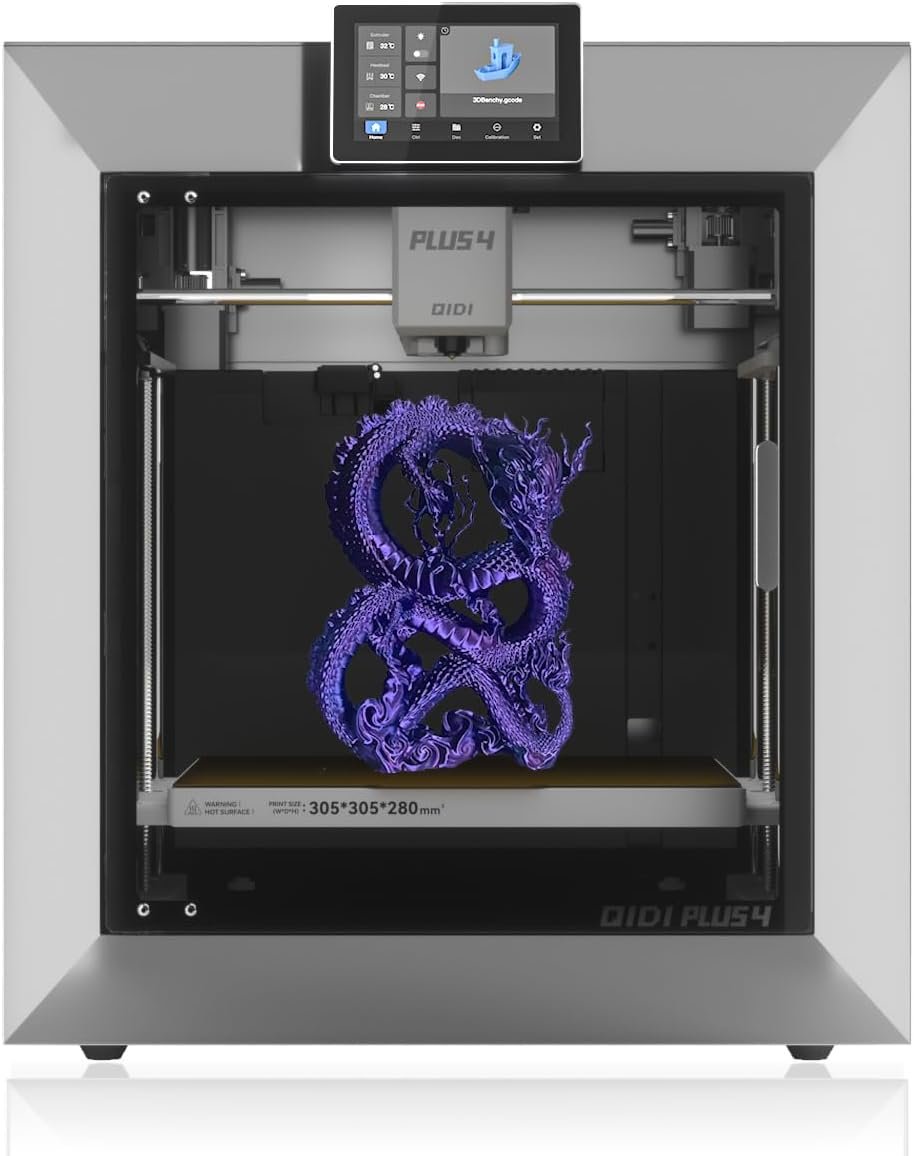
QIDI PLUS4 3D Printer, Max 600mm/s High-Speed Printing, 65℃ Chamber Heat, Fully Auto Leveling, 370°C Direct Extruder with Integrated Nozzle, Support PPS-CF Filaments, Large Print Size 12″x12″x11″
$699.00
Related Products


From the brand

QIDI TECH 3D PRINTER
Industrial Grade Composite
QIDI TECH Common Filaments


Large Size & High-speed Printing: The X-PLUS4 has a large print size of 12 x 12 x 11in, which allows you to print multiple models at the same time, significantly increasing printing efficiency. The X-PLUS4 Inheriting the high speed Core XY structure of X-PLUS3, making it ideal for both professionals and beginners seeking faster and more efficient printing.
Second Generation Active Chamber Heating System: QIDI PLUS4 has upgraded the chamber heating function. It has a Ultra-high heating power of 400W. And it adds air circulation design and dual-layer insulation to make the chamber temperature more balance and consisten. It can effectively reduce warping and cracking when printing high-temperature filaments and improve print quality.
Higher printing temperature & Wide Material Compatibility: The X-PLUS4 comes with an upgraded 80W high-temperature hotend and multi-metal integrated throat nozzle, reaching a maximum temperature of 370°C. Designed for faster installation and removal, it reduces clogging risks and offers exceptional wear resistance. This setup supports a wide range of high-temp filaments, including PPS-CF, PPA-CF/GF, ABS, ASA, PC, PA, PET and more, making it perfect for diverse printing applications.
Powerful & Easy to Operate: Unbox to print in 10 mins. Remote print, real-time progress tracking is always available through the qidi mobile app or qidi studio slicer. X-PLUS4 is also equipped with a HD camera for real-time remote monitoring and time-lapse photography. Filament wrap and break detection features reduce filament waste. It makes it easy for you to achieve total intelligent control, ensuring a safer, more efficient and convenient experience.
Stronger and More Durable: The PLUS4 features an independent dual motor-driven Z-axis, a 6mm thickened aluminium hot bed platform, while upgraded linear shafts & lead screws to 10mm diameter. This increases the strength and flatness of the printer, ensuring high precision and quality printing.
Multi-Colour Printing: QIDI X-PLUS4 3D Printer has the integrated filament cutter, is compatible with the QIDI BOX——Multi-filaments automatic feeding box(a kind of MMU). It will be launched in the first quarter of 2025. It allows you to easily achieve multi-colour printing and freely create personalised designs.
7 reviews for QIDI PLUS4 3D Printer, Max 600mm/s High-Speed Printing, 65℃ Chamber Heat, Fully Auto Leveling, 370°C Direct Extruder with Integrated Nozzle, Support PPS-CF Filaments, Large Print Size 12″x12″x11″
Add a review

$699.00
Emason –
Solid and reliable printer
Far from new into 3d printing. I’ve had my Plus4 for about 6 months now, gone through probably 20-30 rolls of filament at this point printing everything from household items, car parts and accessories, to wargaming terrain and toys. I’ve primarily run PLA, but some ABS and some CF Nylon through it. Setup was fairly easy, as was updating firmware. I’m not new to Klipper either, and Qidi is running a much more recent version of Klipper than my previous XY machine from TwoTrees. I was very happy to see that.So far the only issues I have had was that my printer was one of the models affected by the older solid state relays for the chamber heater. I had not used the heater at that point and was advised by a friend to contact Qidi customer support. They sent me the upgrade kit quickly and with coherent and easy to follow instructions. I’m no stranger to working inside a printer, so it was a straight forward and easy swap to complete. I have since used the heated chamber, and other than taking a long time to heat up it works fine. I found the cooling fan for the mainboard to be a bit noisy and not as effective as I would like, so I swapped that out for a 120mm Noctua 24v industrial fan. I run that at 60% and it keeps my drivers and mainboard cool at a much lower volume. Otherwise I have had no major issues with this printer.My goal when purchasing this printer was to have the ease of use and speed of a bambulabs, with the open source and customizable nature of Klipper, and this printer has not disappointed. It has by far been the most reliable printer I have owned. It runs at the full rated speed without issue and the stock slicer profiles have all worked extremely well for me. I am anxiously awaiting the Qidi Box multi-filament upgrade. I would have liked it just a little bit better if it had a 320×320 like my SP5 turned Voron, and the Z height is slightly lacking, but this has not really been a limitation for me as of yet. Most print files out there are designed for a more “standard” 256×256 build platform, so the 305×305 has fit everything I’ve thrown at it.I’ve been extremely pleased with this printer so far, it’s been a reliable tool which is what I was looking for.On final notes, the community, wiki, and github for this printer is quite active and helpful, and Qidi employees are active commentors and posters in those communities. Generally seen to be actively helping people problem solve, which I love to see.Excellent printer if you want speed and reliability without being locked into proprietary BS firmware and slicer software. It’s reliable enough to be a solid and useful tool out of the box, but still gives you the freedom to modify and make it your own.
Amazon Customer –
I Like The Plus 4 So Much, I Bought A Second One
I have previous experience with QIDI printers (X-CF Pro) and their tech support is very good. I started my 3D printing journey with a Taz Lulzbot Mini. So, I have a little knowledge and expectations for my 3d printers at this point.Looking to have the capability to print the newest hottest printing filament, have a heated chamber and gain speed and 3D print size/volume, the QIDI Plus 4 caught my eye.After hours of watching review videos and weighing the pros and cons, I ordered my first QIDI Plus 4. Fully aware that this is a newly released printer, a couple of issues had already been found by early reviewers and QIDI had either updated firmware or provided instructions to make corrections/fixes.My first Plus 4 arrived in about 10 days and I immediately setup the printer and one of the first things that you really must do is download the newest firmware onto the included USB drive, from the QIDITech website, and update the printer’s firmware through the touch screen menu, selecting ‘Set’, ‘Check for updates’, ‘Offline Update’.I have many successful prints and well over 100 hours on the first printer, with various filaments (ASA, ABS-GF, PA12-CF, PLA+). The only filament issue I had, was when unloading/loading between filaments, I selected the incorrect, too low of a temp, for the filament that the printer cut off and was about to extrude out of the drive gears. The lower temp caused the filament stub to hang in the nozzle and drive gears. Two small hex bolts hold the hot-end on the printer head. With the bolts and hot-end removed, it was easy to pull the stub of ‘cold’ filament down and out of the way and back to loading new filament and printing. Lesson learned … be sure you select the correct temperature for the nozzle to be plenty hot enough to extrude out the remainder of the old filament stub.One of the first print jobs was the ‘Poop Chute’, to catch the purge filament that ejects out the back of the printer. Close to a 8 hour print job and I printed in Polymaker PLA Pro. Flawless print quality for this large-ish print. The longest print job so far was 24 and 1/2 hours of some large cable organizing trays. I printed them in PA12-CF, for strengh. Probably overkill, but might hang heavier items in the trays in the future? Again, impeccable print quality.So, with over 100 hours of pretty much trouble-free printing, I continued to watch for more experiences of other new owners. Mostly positive, with a few early adopter issues, as we can expect. I was having so much fun with the Plus 4, that I decided to buy a second one.The second printer came in only about a week. I already knew the new Plus 4 setup routine and took much less time getting up and going the second time around. After updating the firmware to the newest, I attempted to heat the print bed, before running auto bed leveling and input shaping. As soon I select the temp to heat the bead, the printer shut down. Powered the printer back on and repeated the process, with same shut down results.I had already seen some reviews and new owners, with this issue. Some printers are shipped with the power supply switched for 230V-240V operation, even with a sticker beside the power switch, that says, ‘The input power of the machine is 100V-130V’. You cannot always believe what you read.Tipping the printer up on the side with the power switch, you can see the red slide switch on the power supply to switch it to 100V-130V operation. No shut downs after make the change. NOTE: My first Plus 4 never had to be switched, so you milage may vary. Just be aware that you might have to toggle the little switch.Just finished the ‘Poop Chute’ on the second Plus 4, again in just under 8 hours. This time I printed in ABS-GF and same amazing quality of print, just like the first Plus 4.I had looked closely at the Bambu Lab printers, especially with the multi color filament option (AMU). QIDI has announced their own AMU, for the Plus 4 and possibly other recent QIDI models, that should be out in first quarter 2025. I figured I could wait and get familiar with the Plus 4’s capabilities and any quirks in the mean time. The speed, heated chamber, print size/volume and ability to print the most extreme heat filaments and already being familiar with QIDI, eased my decision making. Oh, and did I forget to mention price? Seems to be a very good value for the price. Of course time will tell.So, I am very happy, so far, with both printers. My previous interactions with QIDI tech support has always been positive. They have always been easy to work with, for me.
Tim Sanderson –
While there was a problem, thanks to Andy at Qidi, the problem was resolved quickly and all is now working well.Thank you Qidi and Andy.
Josue –
Gran impresora excelente calidad de impresión a alta velocidad ningun problema imprimiendo con ABSUn especial agradecimiento a Andy de soporte técnico de QIDI por la excelente atención
Great product saves time with all four tires at once –
Very happy with this purchase works very well
Ricky –
Absolute lemon of a product. Bed leveling doesn’t work. MCU over heats. Start gcode breaks the nozzle. PTFE tube rubbing and breaking away. Tool head board overheats. Klipper version is dirty. I wish I returned this before trying to fix anything because now I’ve just spent money on this hot garbage
Y –
Estoy escribiendo esta reseña con 1 mes de uso, planeo volver en un año para actualizarla.El hecho de que sea una impresora con cámara cerrada ayuda bastante con la impresión de ABS y PETG, sin mencionar que la forma de usarla es bastante cómoda y sencilla, además de que es bastante rápida para imprimir. La cama por lo general es bastante adhesiva pero en algunos casos es necesario usar pegamento (viene uno incluido en la caja). Además, viene con dos tipos de boquillas, una de latón para los filamentos sencillos y una de acero negro para los filamentos abrasivos.Algunas de las cosas negativas que he visto de momento es que no tiene un “reinicio seguro” cuando se va la energía o la desconectas por accidente, entonces si estabas imprimiendo algo tendrás que iniciar desde el principio; la caja para guardar el filamento está en la parte de atrás, por lo que puede ser algo incómodo si cambias de filamentos constantemente.