

Creality K1C 3D Printer, 600mm/s High-Speed Auto Leveling Clog-Free Robust Direct Extruder K1 SE Upgraded 3D Printer with AI Camera 300°C Printing Silent Mode Support Carbon Fiber Filaments
$78.99
Related Products


From the brand

Creality 3D Printers
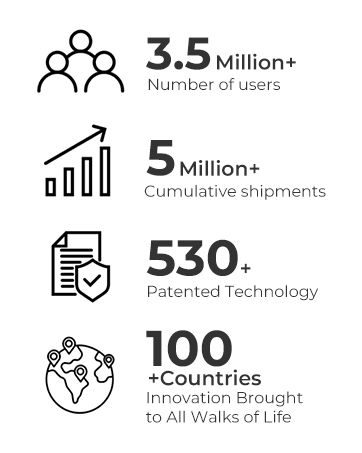
540+ Patented Technology, 3.5 Million+ Number of users
Better Performance Achieved with Creality
Official 3d Printer Filament
Creality Popular 3D Printers
Ender 3 V3 and K1 K2 Series
3D Printers and Accessories
Ender 3 Series
Ender 3 Series
Ender 3 Series

Creality 3D Technology Co., Ltd. focuses on the design, research, production of 3D printers and 3D printing related products. Consisting of professional researchers and skilled engineers, our R&D team constantly strives for creative function and excellent user experience.
The R&D investments on 3d printing cover FDM/resin 3D printers, 3D scanners, filaments, resin, as well as 3D printed drones and robots that back up STEAM education.
【CoreXY, 12X Super Fast】Creality K1C 3D Printer inherits the lightweight and agile CoreXY system of K1, Max 600mm/s speed and 20000mm/s² acceleration.It can maintain print quality while printing at high speed, it is 12 times faster than the other normal 3d printer.
【Clog-free Direct Extruder & Tri-metal “Unicorn” Nozzle】Creality K1C is an upgraded version of K1 SE, K1 and K1 Max. It has more powerful functions and supports printing carbon fiber filaments. K1C 3d printer equips a clog-free robust direct extrude, enhanced with a bolster spring and a ball plunger.It forms a strong grip, enhanced reliability that won’t slacken off. Steel-tipped copper nozzle integrated with a titanium alloy heatbreak.It is free of clogs and can be swapped quickly.
【Hands-free Auto Calibratio Leveling & Dynamic Balancing for Reduced Vibration】Just give a single tap, and the auto-calibration gets leveling and everything ready for you with smart sensors. The weight of printhead fans is dynamically balanced so they are less likely to wobble, minimizing ringing or ghosting.
【K1C with AI Camera】K1C is equipped with an AI camera as standard. It can always monitor whether there are foreign objects or malfunctions during the printing process. and enables real-time monitoring, time-lapse photography functions.
【Carbon Fiber Reinforced & Filaments Well Supported】K1C features a enclosed chamber design, 300°C hotend and hardened steel nozzle tip. K1C can prints well with high-temp and wear-resistant PLA-CF, PA-CF, PET-CF, ASA, etc, K1C is suitable for carbon fiber 3d printing.
【Long-lasting Purification & Silent Mode ≤45dB】Air purification system uses activated carbon bags to effectively purify odors and particles produced by melting consumables. During the printing, you can switch to silent mode with one click, which can reduce noise to 45dB without affecting work or rest.
【Creality OS & Superb Software Ecosystem】Creallty OS based on Kipper, powerful, completely open source, support for custom optimization. Creality Print slicing software support for intelligent cooling, pumpback optimization, seedling tree support, but also to facilitate the user remote control of multiple printers.
【Creality Official Support Service】Creality provides 12-month after-sales service for the creality 3d printer. If you have any question or need support about the product, Please contact me via Amazon, we will respond with 24 hours
11 reviews for Creality K1C 3D Printer, 600mm/s High-Speed Auto Leveling Clog-Free Robust Direct Extruder K1 SE Upgraded 3D Printer with AI Camera 300°C Printing Silent Mode Support Carbon Fiber Filaments
Add a review

$78.99
Randomguy –
Good quality out of the box!
Really nice printer… I’ve been using it for a couple weeks now and printed many things… The best thing to do is to get a dryer along with the 3d printer… It will improve your prints greatly. Also learning to fines the settings helped a lot. I saw a big difference in PETG print quality just changing the temp of the hot bed from 57C to 56C…I recommend downloading other peoples 3d modles from online sources like [Printable.com, makerworld.com or thangs.com] for the door hinges, front plate, exhaust fan upgrades and (riser plates (if you intend on using CF filaments)) to get started and learn about how the cad models work and need to be physically one piece for the Creality Print or Cura to work with them. Most software can only do so much to “repair” models someone might create in Blender… FreeCAD isn’t that great but using TinkerCAD with Blender has shown me some decent results and is completely free. AutoDesks 360 fusion looks nice if you have some cash for softwawre they also have a free trial where you can make 9 editable files with there cloudbased software. I have enjoyed this new device since I’m always looking to fix or upgrade things and this allows for SOOOO much more inventive creativity.It has a setting called [ Silent ] too, which slows the printer down to silent volumes which is very awesome since I live next to persnickety people in apartments. It won’t turn down the “travel” speed that much so the setting will need to be adjusted inside Creality print advanced settings if true silence is needed since it has insanely quick and efficient motors. It has auto leveling/calibrations, Lan and usb connectivity if you don’t trust Wifi and I don’t in apartments. It’s easy enough to mess the prints up let alone having wifi hackers interrupting file transmissions..I’ve heard and seen lid risers are needed to print Carbon Fiber prints due to the angle of the Bowden stock tube… ASA makes a good filament for the risers since its high working temp, rigidness and resistance to chemicals like those emited during prints sometimes. Since starting I haven’t had to do much of anything to make it work soundly (since I haven’t used CF filaments yet) and that is awesome! Make sure to use glue stick. Customer support is responsive for any needs and many videos online to help replace, upgrade, install, and maintain the device.I used the original plastic off the sides of the machine to help create a better seal on the front door (looks ugly but it’s free and came with the machine), this keeps everything nice inside when printing and lowers the dB volume outside. Make sure if you decide to upgrade the back fan that you use a DC24v fan. You can place a piece of active carbon filter where the original fan once was… I also put a 5lbs sand back on the edge of the top of the machine which reduces vibrations and movement of the machine when travel is going fast… Don’t place it in the center or you will scratch the bottom of the plate like I accidentally did… Risers would have stopped that but I haven’t finished them yet…an old tooth brush with either isopropyl alcohol or water works really well to clean the build plate rather than using rags and having to wash them… plus if you do it right you can use the old glue and just make a nice finish with just a little water and effort.
riley burris –
Less waste with this printer
The noise level is standard. It’s print qualities. Great!. I’ve had no problem with adhesion. The AI feature is self-learning. It asks you questions and you give it input. The amount of time it took to set it up was 30 minutes. The functionality of it is great. A wide variety types of filaments can be used. The ability to control its temperature inside its case is a godsend. It helps in the printing function and the ability to create smoother textures.
Richard John Andrade –
Printer,came with something I did not expect. a blockage in the Teflon Filament tube.
Box was delivered well, not crushed. Printer was excellently packed. I installed it only to find that when I tried to feed filament into the teflon filament tube so that it could enter the extruder, there was a preexisting blockage. White, about and inch long. I have not had the chance or energy to disassemble the extruder and try to remove the blockage. Printer won’t print as filament cannot reach extruder. I like the printer and am impressed but am annoyed that there was a blockage and I have not used it. Maybe the extruder assembly is tested before installation Into the printer? I don’t know. I guess I just have to disassemble the extruder (remove the shroud and detach it to get to the Teflon Tube. hopefully the blockage just falls out. I give it 1 star because of this. Very anticlimactic experience because everything else is top notch. Still spending the money only to have to take it apart to fix it… not a good initial experience. And really…. who you gonna call? Ghostbusters? Maybe that would be easier… how to contract Creality? No info anywhere… so… maybe being a computer engineer with access to YouTube will help. Although Crealty has upgraded the extruder shroud and housing as mine looks updated from what I have found in videos. If the blockage comes out easily and I can print, I will come back and update my review.
Ard Media –
Amazing printer
The Creality Ender 3 V3 Plus offers a large build volume, solid print quality, and easy setup for the price. It runs reliably once dialed in and handles everyday prints with no issues. Great option for beginners or hobbyists looking for a capable printer without spending a fortune. times!
Vic Soders –
Affordable, capable, Wifi card is garbage
Can print its butt off, but the software has an issue with losing WiFi and it’s quite annoying.
Jonathon –
Quiet, efficient, trustworthy
I love this printer. The ability to monitor my print when im away from home is incredible. Its easy to start or stop prints when im at work through utilizing the creality app.The self leveling is a game changer and the unicorn nozzle drastically reduces the clogging nozzles. The only time I had a clogged nozzle was when I used a filament without checking its variance. Sothe clog was 100% my fault.The enclosed case makes it much quieter and keeps the heat more consistent especially since I have my set up in my bedroom which stays pretty cold.This printers performance led me to purchase the k2 max and I love that model even more. Creality is a very successful brand when it comes to this flagship series.
Richie –
Great seller , really good communication.Printer is really good . The model in the pic (groot) is 29.5cm tall , and came out amazing ! No visible layer lines !!I upgraded from an Ender 3 neo v1 and this is soo much better . I just wish it had the same bed levelling and auto Z offset as the Ender 3 v3 se , but the larger build volume more than makes up for it . And the levelling is so much better than the older Enders.So much more reliable than my old printer due to the direct drive.
Ernesto Mtz –
Después de mucho investigar sobre equipos de impresión 3D que tuvieran una buena relación costo -calidad, llegue a este producto de la marca Creality, modelo CR-10S,. Cabe destacar que El ensamble fue muy intuitivo y rápido, su configuración y nivelación, un poco más complicado pero nada que no se pudiera resolver, su calidad de impresión muy notable y de muy buena resolución, en general, que de muy satisfecho de esta compra
Vincent Rumberg –
Great deal, perfect build volume!
Jairo Ivo –
Comprei a impressora já a algum tempo e está funcionando perfeitamente, a loja tem um ótimo acompanhamento do produto e durante o processo de entrega recebi vários email da empresa sempre me mantendo informado das condições.É uma impressora incrível, depois da mesa nivelada, ela faz tudo praticamente sozinha, sem que seja nescessário procedimentos mais complexos de manutenção.Em resumo: ótimo produto, ótimo vendedor e estou super satisfeito com a compra.
Marcio Lima –
Embalagem totalmente lacrada, tudo bem embalado.Primeira experiência com impressora 3D e não tive dificuldade para montar e nem para começar a imprimir.Já vem com todas as ferramentas necessárias para montagem.Pelo menos nesse modelo um dos grandes segredos são os ajustes iniciais, como o nivelamento.Documentação que vem no cartão de memória, bem mais detalhada do que a impressão. Ambas as versões possuem o manual em português do Brasil.